Managing access
This guide is for the administrator of a running Wagoe app: the person who decides who may sign in and what they may do there. The steps are in Access tasks; when something does not work, see Access troubleshooting.
Developers declaring permissions and route rules want Authorization instead.
The ideas
- User
-
Someone who can sign in. A user is active or deactivated.
- Platform admin
-
A user with the role Admin and no tenant. A platform admin may do everything, whatever their groups. Users, groups and roles are managed by users with the role Admin. Give it to as few people as you can.
- Permission
-
One thing a user may do, written
<module>/<action>:orders/read,orders/write,orders/refund. Each admin entity has two:admin.orders/readopens the orders list,admin.orders/writechanges orders. - Role
-
A named set of permissions, such as
orders/viewer. There are two kinds:-
Code roles come with the app. They are locked; you cannot change them.
-
Managed roles are the ones you make, from a checklist of permissions.
-
- Group
-
A set of users. You give rights to a group, never to one user. Members are added by hand, or come from your identity provider when users sign in with single sign-on (SSO); those memberships are read-only here.
- Everyone
-
A built-in group of every signed-in user, including people who sign up later. Give it what every user should be able to do.
- Assignment
-
A role on a group, with an optional scope. The scope narrows the role to part of the data, such as one domain or one customer. No scope means everywhere. A scope value is fixed (
domain 4), or taken from the user (the member’s department), so one group serves every department.
A user may do what the roles on all their groups allow, each within its scope. Rights add up: nothing a group gives is taken away by another. A change counts from the user’s next click; they do not need to sign in again.
A worked example
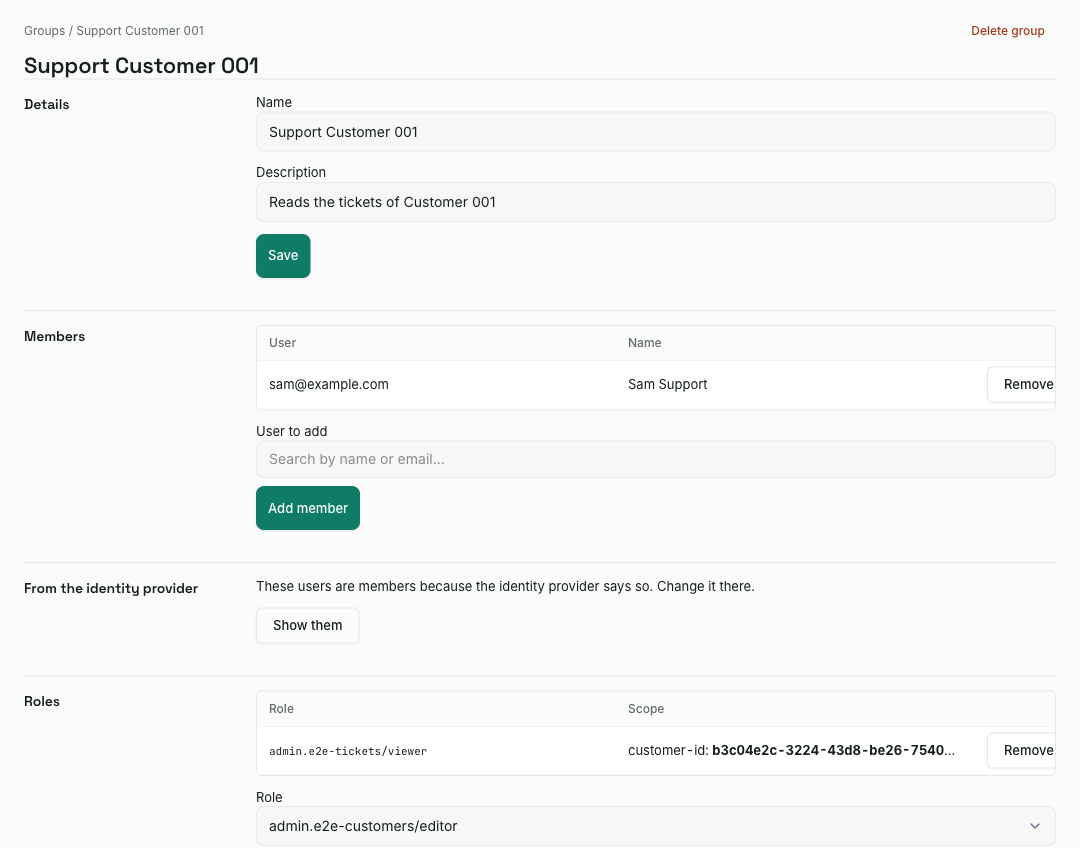
Sam answers support tickets for one customer. He should read that customer’s tickets and nothing else.
-
Create a group Support Customer 001 and add Sam.
-
On the group, assign the role
admin.tickets/viewerwith the scope customer: Customer 001. -
Open Sam’s Rights tab. It lists
admin.tickets/read, from that role and group, with the customer as its scope. -
Sign in as Sam in a private window. The admin shows Tickets and nothing else, and the list holds only Customer 001’s tickets. A ticket of another customer answers not found, and there is no button to change one.
To let Sam answer the tickets as well, assign admin.tickets/editor instead.
For a second customer, assign the role again with that customer.
The first admin
A new app has no users. On the server, from the app’s directory, create the first platform admin:
bb create-admin                  # asks for email, name and password
bb create-admin --env prod       # against the production configuration
The database must be migrated first: clojure -M:migrate up, unless the app
migrates when it starts. The password must meet the app’s password policy and
may not contain the email address.
Then sign in at /web/login. You land on the dashboard, /web/admin/. The
sidebar’s Users section holds everything this guide uses: Users, Groups,
Roles, Permissions and Audit Trail.
Under :enforce, every other new user signs in to an empty admin until a
group of theirs has a role.
Switching checks on
:wagoe/authorization {:mode …} in config.edn sets how strictly rights
are checked: :off checks only sign-in, :report refuses nothing but logs
what :enforce would refuse, and :enforce refuses. A new app starts on
:enforce; an older one is :off until it is moved.
bb upgrade authorization moves an existing app step by step and says who
would lose or gain access at each one; see
Upgrading an existing app to permissions. The
manual steps are in Authorization.
Your part is the :report phase. Run the app as usual for a few days; each
refusal is logged as a warning, at most once a minute per user and route:
Authorization would refuse this request under :enforce {:mode :report :user-id … :route "/api/v1/orders" :method :post :permission :orders/write :reason :forbidden}
Admin authorization would refuse this under :enforce {:user-id … :entity :orders :permission :admin.orders/write}
Admin authorization would keep this user out of the admin under :enforce {:user-id …}
For each line, decide whether that user should be allowed. If so, give one of
their groups a role holding the permission. If not, leave it: that is what
:enforce is for. A route logged with no permission has no rule at all; that
is for a developer, and clojure -M:run authz-report lists every such route.
Switch to :enforce when the lines you meant to fix have stopped, then narrow
Everyone to what every user should really have.
To roll back, set the mode to :report or :off and restart. Groups, roles
and assignments stay as they are, ready for the next try.